

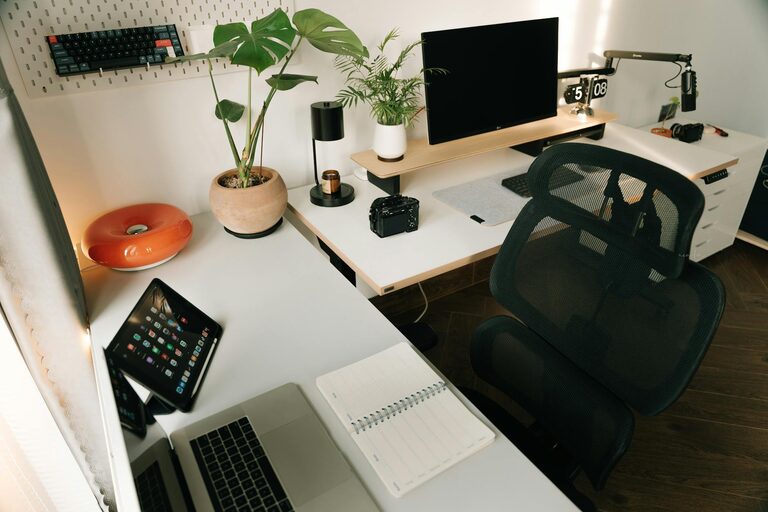
Creating an organized home workspace can dramatically improve your productivity and comfort throughout the day. Whether you work remotely full-time or occasionally, having a space that’s neat, functional, and inviting makes a big difference in how you focus and feel. In this post, we’ll share simple tips to help you organize your home workspace to maximize both efficiency and comfort.
Why Organizing Your Workspace Matters
Your workspace influences your mindset and work habits. A cluttered, chaotic area can lead to distractions, frustration, and reduced motivation. On the other hand, a well-organized and personalized space promotes clearer thinking, creativity, and a smoother workflow. When everything has its place, you spend less time searching for items and more time getting things done.
Step 1: Choose the Right Location
Pick a Quiet Spot
Select a quiet and well-lit area for your workspace. Ideally, it should be separate from high-traffic zones and distractions like the TV or household noise. A corner in your bedroom, living room, or a spare room can work well.
Prioritize Natural Light
Natural daylight helps reduce eye strain and boosts mood. Position your desk near a window if possible. Supplement with adjustable desk lamps for darker hours.
Step 2: Declutter and Sort
Clear Everything Off
Start fresh by removing all items from your desk and surrounding shelves. This helps you see what you have and decide what’s necessary.
Sort and Categorize
Group items into categories such as stationery, gadgets, documents, and personal touches. Be honest about what you truly need daily and what can be stored elsewhere.
Remove Unnecessary Items
If something hasn’t been used in a month or doesn’t contribute to your work, consider donating, recycling, or storing it away from your desk.
Step 3: Invest in Functional Storage Solutions
Use Drawer Organizers
Keep small items like pens, paper clips, and sticky notes neatly separated in drawer organizers. This prevents messy piles and saves time searching.
Incorporate Shelving or Filing Cabinets
Vertical storage reduces clutter on your desk surface. Use shelves or a filing cabinet to organize documents, books, and supplies.
Try Desk Organizers and Containers
Containers, trays, or small boxes keep essentials accessible yet contained. Assign a container for charging cables, another for office supplies, and so on.
Step 4: Optimize Your Desk Setup for Comfort
Choose an Ergonomic Chair
An adjustable chair with good back support helps maintain posture during long hours. Avoid working from your couch or bed when possible.
Position Your Monitor Correctly
Your computer screen should be at eye level to prevent neck strain. Use a monitor stand or stack books to raise your screen height if needed.
Keep Essential Tools Within Reach
Place your keyboard, mouse, pen holder, and notebook in easy reach to reduce repetitive stretching or shifting.
Step 5: Personalize and Add Comfort
Add Plants or Natural Elements
A small plant or a vase of flowers can boost mood and air quality. Natural elements bring calming colors and texture to your setup.
Use Soft Lighting Options
Consider a desk lamp with adjustable brightness and warm light to create a cozy, productive atmosphere in the evenings.
Incorporate Personal Touches
Display a favorite photo, artwork, or inspiring quote. Personal touches help make your workspace feel welcoming and motivating.
Step 6: Establish a Cleaning and Maintenance Routine
Daily Quick Tidying
Spend 5 minutes at the end of each workday putting things back in their place. This prevents clutter buildup.
Weekly Deep Clean
Dust surfaces, vacuum mats or rugs, and wipe your computer and keyboard weekly for hygiene and upkeep.
Periodic Organization Check
Reevaluate your storage system every few months. Adjust or declutter as your work needs evolve to keep your space efficient.
Bonus Tips
– Cable Management: Use clips, ties, or sleeves to keep cords untangled and out of the way.
– Use a Whiteboard or Planner: Keep track of tasks and deadlines visually within your workspace.
– Limit Distractions: Turn off phone notifications or use apps that block distracting websites during work hours.
Final Thoughts
Organizing your home workspace doesn’t have to be overwhelming. By following these simple, practical tips, you can create an environment that encourages focus, reduces stress, and makes your workday more pleasant. Remember, the best workspace is one that fits your personal style and work habits. Take your time to arrange it thoughtfully, and enjoy the benefits of a productive, comfortable home office.
—
For more tips on organizing and productivity, explore our other blog posts and feel free to share how you’ve made your workspace your own!